We have a lot to share about this topic. So if you want to learn, read carefully.
First, you want to know that the information will be divided in two parts:
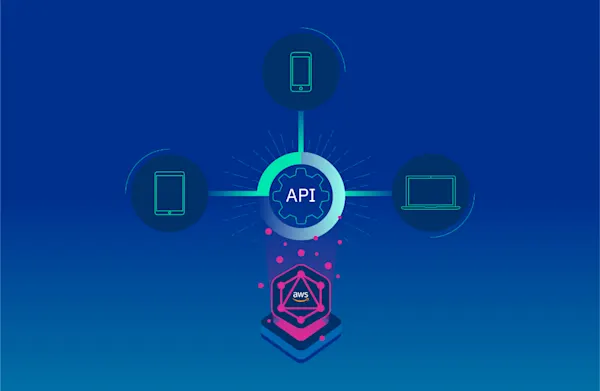
In this article, we will address basic concepts of GraphQL. We will design a simple API from scratch, and we will deploy it using AWS AppSync and Serverless Framework.
In the second part, we will create a client-side application to consume the API. We will use Amplify+React JS framework, and we will fit our API with more features by using subscriptions for a case of real-time use.
What is GraphQL?
GraphQL is a data query language for APIs, the essential idea is to make the API available through a single endpoint, instead of accessing several endpoints, as it is currently done with REST.
Among the advantages of GraphQL we can list the following:
Customers can specify exactly the structure of the data that will be served.
Efficiency in data loading, improving bandwidth use.
Declarative and self-documenting style, thanks to its strongly typed schemas.
Schemas
Schemas determine APIs capacity and define three basic operations: query, mutation, subscription. It also includes entry parameters and possible responses.
Resolvers
Resolvers implement APIs and describe the server's behavior. They are basically functions that are in charge of obtaining data for each field defined in the schema.
AWS Appsync + Serverless Framework
AppSync is a serverless service managed by AWS; it is GraphQL layer that will help us to develop our API smoothly. It is important to know AppSync basic components:
Schema: As we said before, it will help us to define basic types and operations to retrieve and save data.
Resolvers: They define query mapping templates and response templates for each field defined in the schema. They are written in VTL and are responsible for interpreting the responses from data sources; they also analyze queries.
Data sources: Integration with AWS services: DynamoDB, Lambda, RDS, and ElasticSearch.
Authentication: We can authenticate APIs by using API keys, IAM or Cognito User Pools
As we can see, AppSync provides some tools to build a GraphQL API smoothly. We just follow a series of steps in the AWS AppSync console and, in a few minutes, we will have a functional app. However, we prefer to do it in a way that keeps it closest to the reality of modern production applications.
Here's where Serverless Framework comes into play: A robust technology for defining infrastructure as code focused in serverless applications for different cloud providers. At Kushki, we believe that, nowadays, having a versioned and automated serverless infrastructure is crucial. We will see that it is a practical and efficient way of implementing our API. Serverless features several options to deploy AppSync in the cloud.
Let's start to put into practice all these concepts by creating a simple application.
The application: To-do List
In this first part of the article, we will create a GraphQL API of a CRUD To-Do List. We will use DynamoDB for the database.
Requirements:
NodeJS
An account in AWS (set up credentials)
Serverless Framework
Let's start installing Serverless Framework and a plugin for Appsync:
npm install -g serverless serverless-appsync-plugin
In the main directory of the project, we will execute the following command to create a template containing the configurations we need to create a serverless application in AWS.
serverless create --template aws-nodejs
Note: Add serverless-appsync-plugin in the plugins section of the serverless.yml file:
First, we'll define part of our infrastructure. To do this, we will create an all table in DynamoDB, in serverless.yml. At this moment, we will not worry about multiple configurations, the following fragment of code will be enough:
yml resources: Resources: all: Type:"AWS::DynamoDB::Table" Properties: TableName: all AttributeDefinitions: - AttributeName: id AttributeType: S KeySchema: - AttributeName: id KeyType: id KeyType: HASH BillingMode: PAY_PER_REQUEST
Define a GraphQL Schema
In the root file, create a schema.graphql file. Here is where we will define our schema and data types. For the moment, we will define the query and mutation operations. GraphQL has its own syntax, called SDL, here you can learn more about this topic.
query: Query
mutation: Mutation
}
type Query {
listToDos: [ToDo]
getToDoById(id: ID!): ToDo
}
type Mutation {
createToDo(input: CreateToDoInput!): ToDo
updateToDo(input: UpdateToDoInput!): ToDo
deleteToDo(id: ID!): Boolean
}
type ToDo {
id: ID!
name: String
title: String!
description: String
completed: Boolean!
}
input CreateToDoInput {
id: ID!
name: String!
title: String!
description: String!
completed: Boolean!
}
input UpdateToDoInput {
name: String!
title: String!
description: String!
completed: Boolean!
} ```
Remember that for each field you define, you need to implement a resolver. In this case, our resolvers are queries for DynamoDB, written in VTL. There are some utility functions that will make its implementation easier, for more information on resolver mapping templates, you may [check this link.](https://docs.aws.amazon.com/es_es/appsync/latest/devguide/resolver-mapping-template-reference-overview.html)
### createToDo Resolver:
We will create a mapping-templates directory in the root file of the project where we are hosting **the query and response resolvers** for each field created in the schema.
**Request**: Create a createToDo-request.vtl file and insert the following code:
json { "version" : "2017-02-28", "operation" : "PutItem", "key" : { "id" : $util.dynamodb.toDynamoDBJson($context.arguments.input.id) }, "attributeValues" : { "name" : $util.dynamodb.toDynamoDBJson($context.arguments.input.name), "title" : $util.dynamodb.toDynamoDBJson($context.arguments.input.title), "description" : $util.dynamodb.toDynamoDBJson($context.arguments.input.description), "completed" : $util.dynamodb.toDynamoDBJson($context.arguments.input.completed) } }
Using the variable $context.argument we can have access to the entry parameters that we have defined in our schema.
**Response:** Create a createToDo-response.vtl file and insert the following code:
json $utils.toJson($context.result) Do not worry about how data are obtained from DynamoDB, AppSync performs the connection with data sources, returns data in the variables $context.result and $utils.toJson, and displays them in an readable format for GraphQL. If you want to process these data in the resolver, you can do it using VTL.
### updateToDo Resolver:
**Request:** Create an updateToDo-request.vtl file and insert the code below; in this case, we will use an UpdateItem operation of DynamoDB:
json { "version" : "2017-02-28", "operation" : "UpdateItem", "key" : { "id" : $util.dynamodb.toDynamoDBJson($context.arguments.input.id) }, "update" : { "expression" : "SET name = :name, title = :title, description = :description, completed = :completed", "expressionValues": { ":author" : $util.dynamodb.toDynamoDBJson($context.arguments.input.name), ":title" : $util.dynamodb.toDynamoDBJson($context.arguments.input.title), ":content" : $util.dynamodb.toDynamoDBJson($context.arguments.input.description), ":url" : $util.dynamodb.toDynamoDBJson($context.arguments.input.completed) } } }
**Response:** Create a createToDo-response.vtl file and insert the following code: json $utils.toJson($context.result)
### getToDoByID Resolver:
**Request:** Create a createToDoById-request.vtl file and insert the following code:
json { "version" : "2017-02-28", "operation" : "GetItem", "key" : { "id" : $util.dynamodb.toDynamoDBJson($context.args.id) } }
**Response:** Create a getToDoById-response.vtl file and insert the following code:
json $utils.toJson($context.result)
We will define our AppSync infrastructure and the servereless.yml file, where we will define the resolvers (mappingTemplates), schema (schema), data source, and authentication type (authenticationType). It should have the following structure:
```yml service:
name: appsync-todo-app-backend
plugins:
- serverless-appsync-plugin
custom:
appSync:
name: todo-app
authenticationType: API\_KEY
mappingTemplates:
- dataSource: all
type: Mutation
field: createToDo
request: "createToDo-request.vtl"
response: "createToDo-response.vtl"
- dataSource: all
type: Mutation
field: updateToDo
request: "updateToDo-request.vtl"
response: "updateToDo-response.vtl"
- dataSource: all
type: Query
field: getToDoById
request: "getToDoById-request.vtl"
response: "getToDoById-response.vtl"
schema: # defaults schema.graphql
dataSources:
- type: AMAZON\_DYNAMODB
name: all
description: 'All table'
config:
tableName: all
provider:
name: aws
runtime: nodejs12.x
resources:
Resources:
all:
Type: "AWS::DynamoDB::Table"
Properties:
TableName: all
AttributeDefinitions:
- AttributeName: id
AttributeType: S
KeySchema:
- AttributeName: id
KeyType: HASH
BillingMode: PAY\_PER\_REQUEST ```
Finally, we will execute the following command to deploy our API in the AWS cloud:
serverless deploy
Testing our GraphQL API:
------------------------
If we open AWS AppSync console, we will see the schema, the resolvers, the authentication and the data source that we have defined.
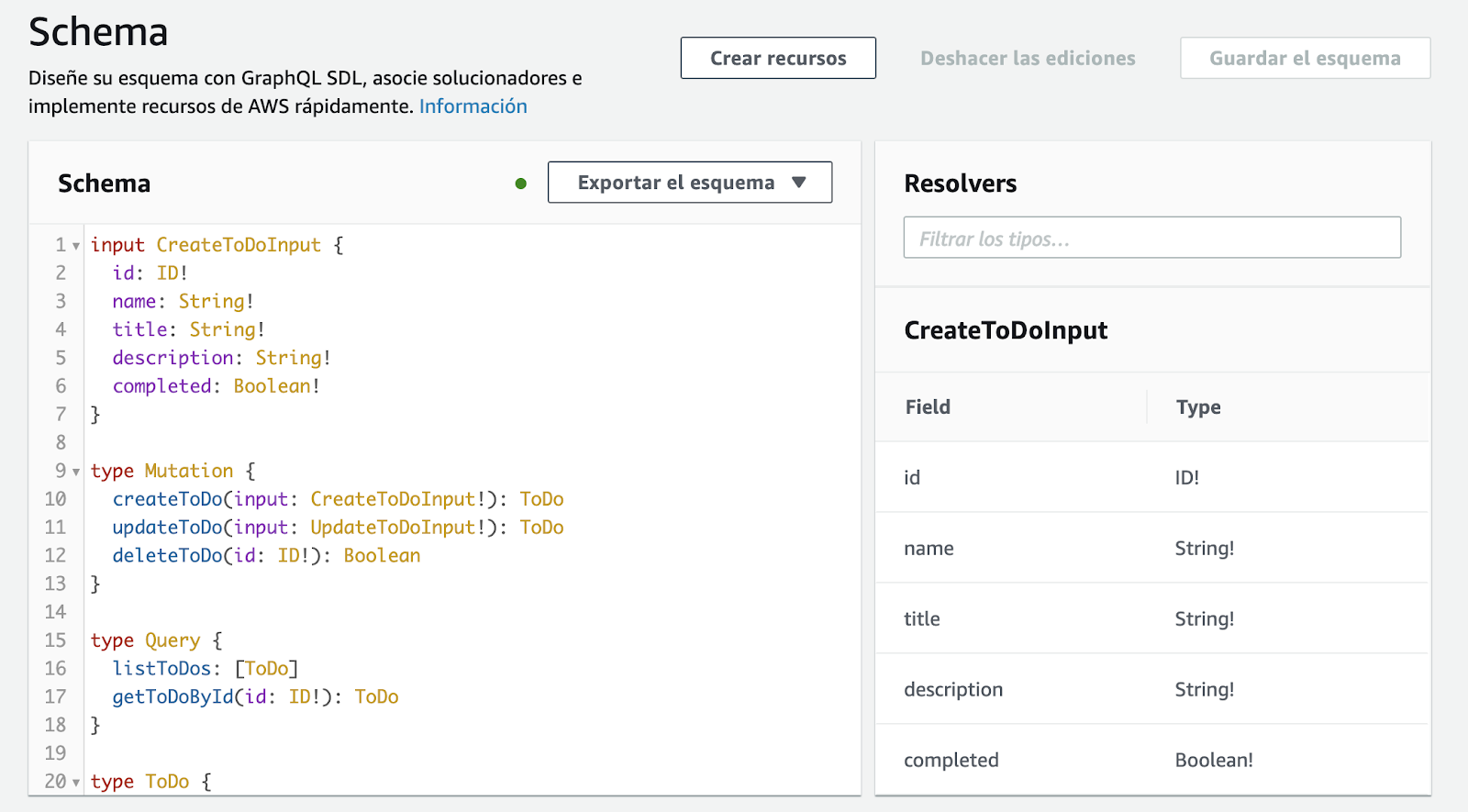
On the other hand, we also have a GraphQL client that we will use to test our API. In the Figure below, we can see the API's documentation according to the schemas defined.
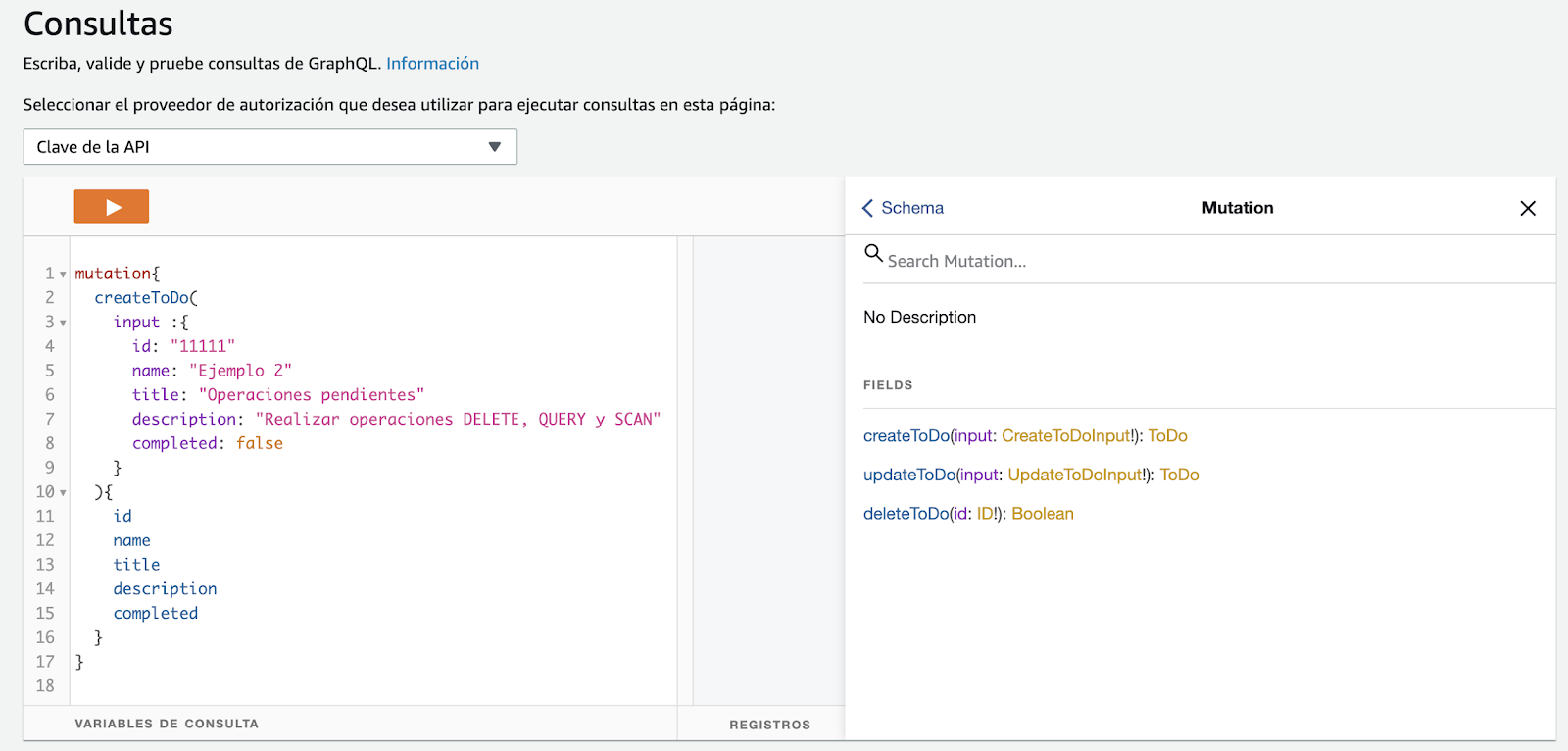
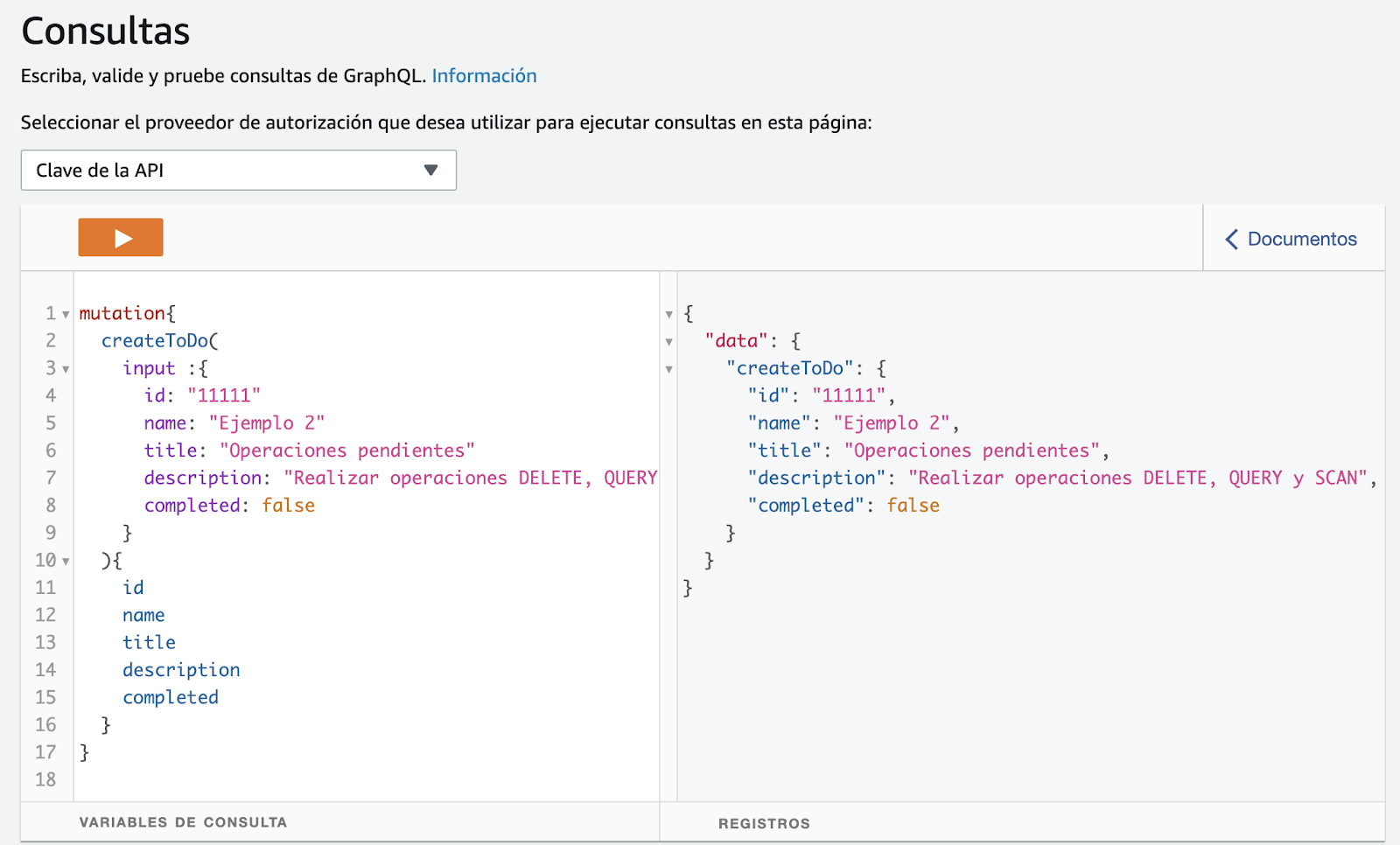
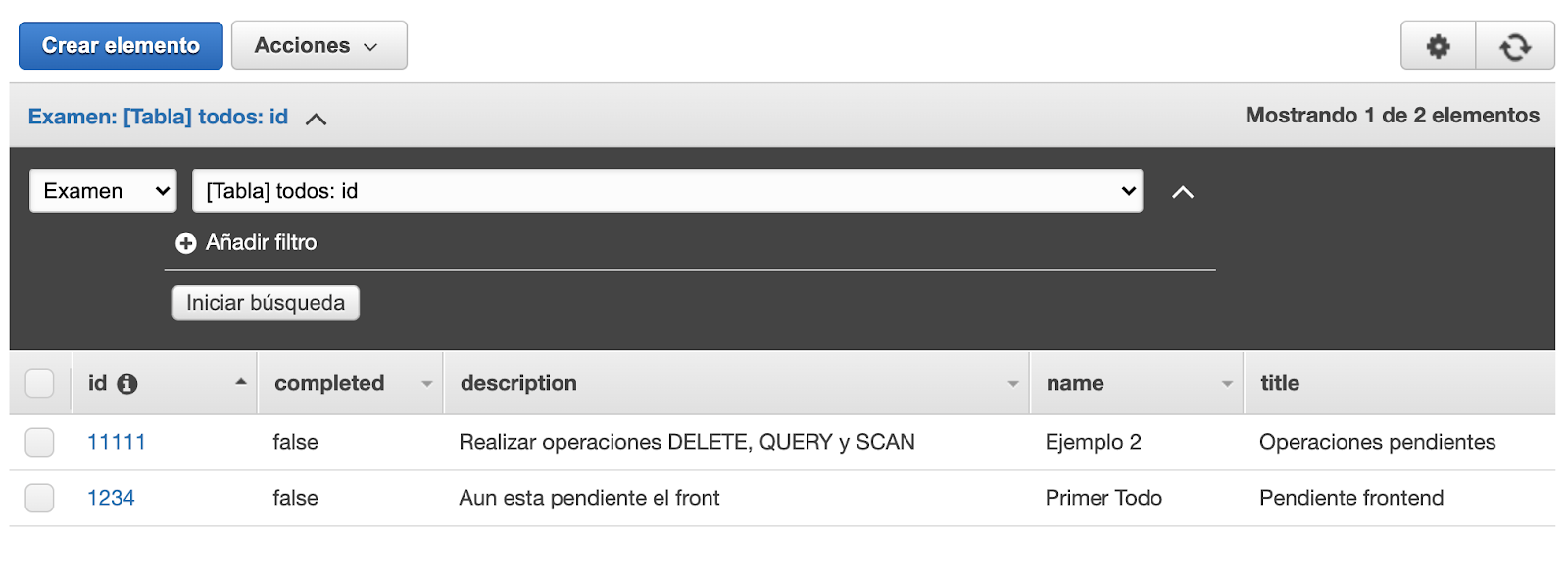
When executing the createToDo **mutation operation** a registry is created in DynamoDB and returns the object created according to the defined fields.
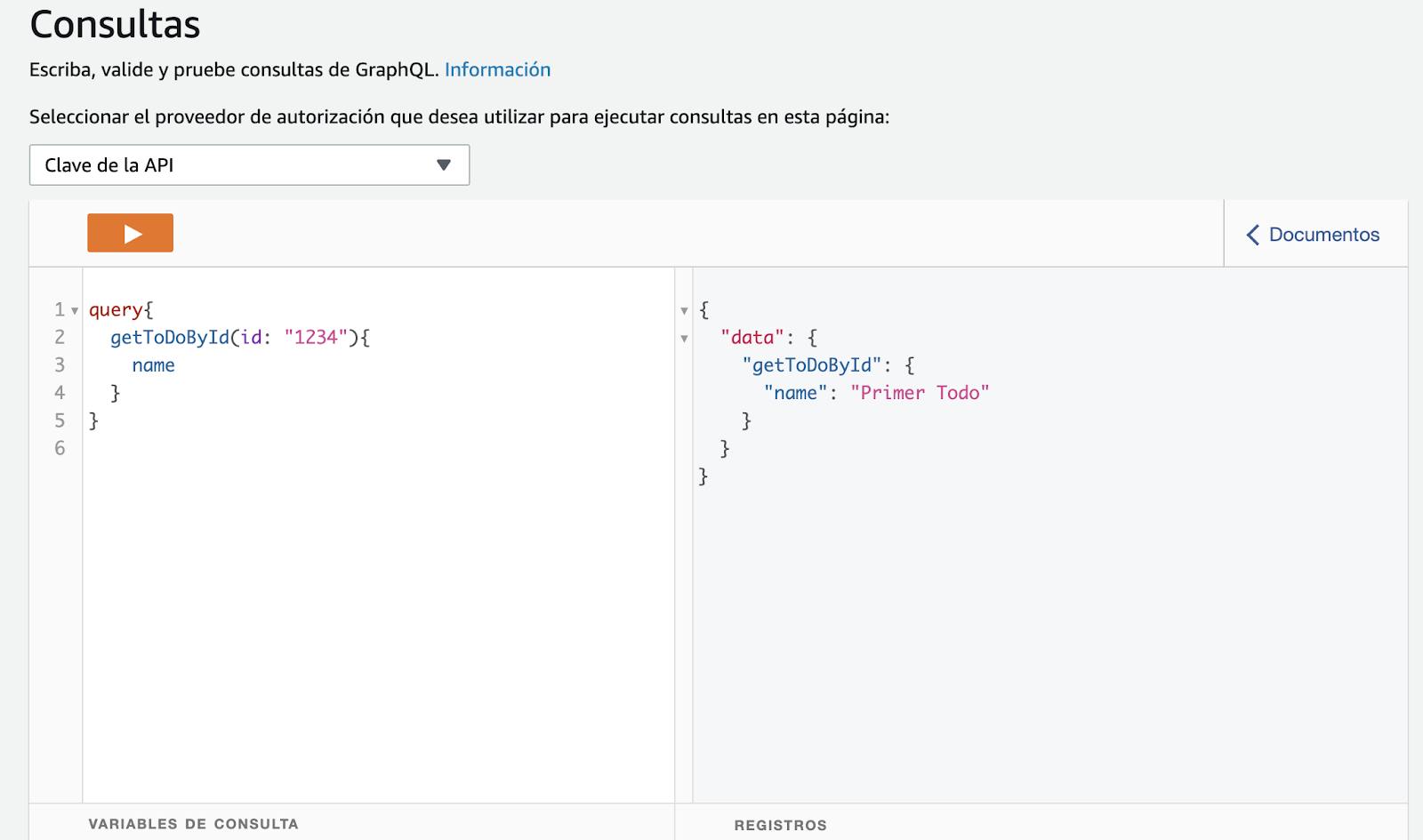
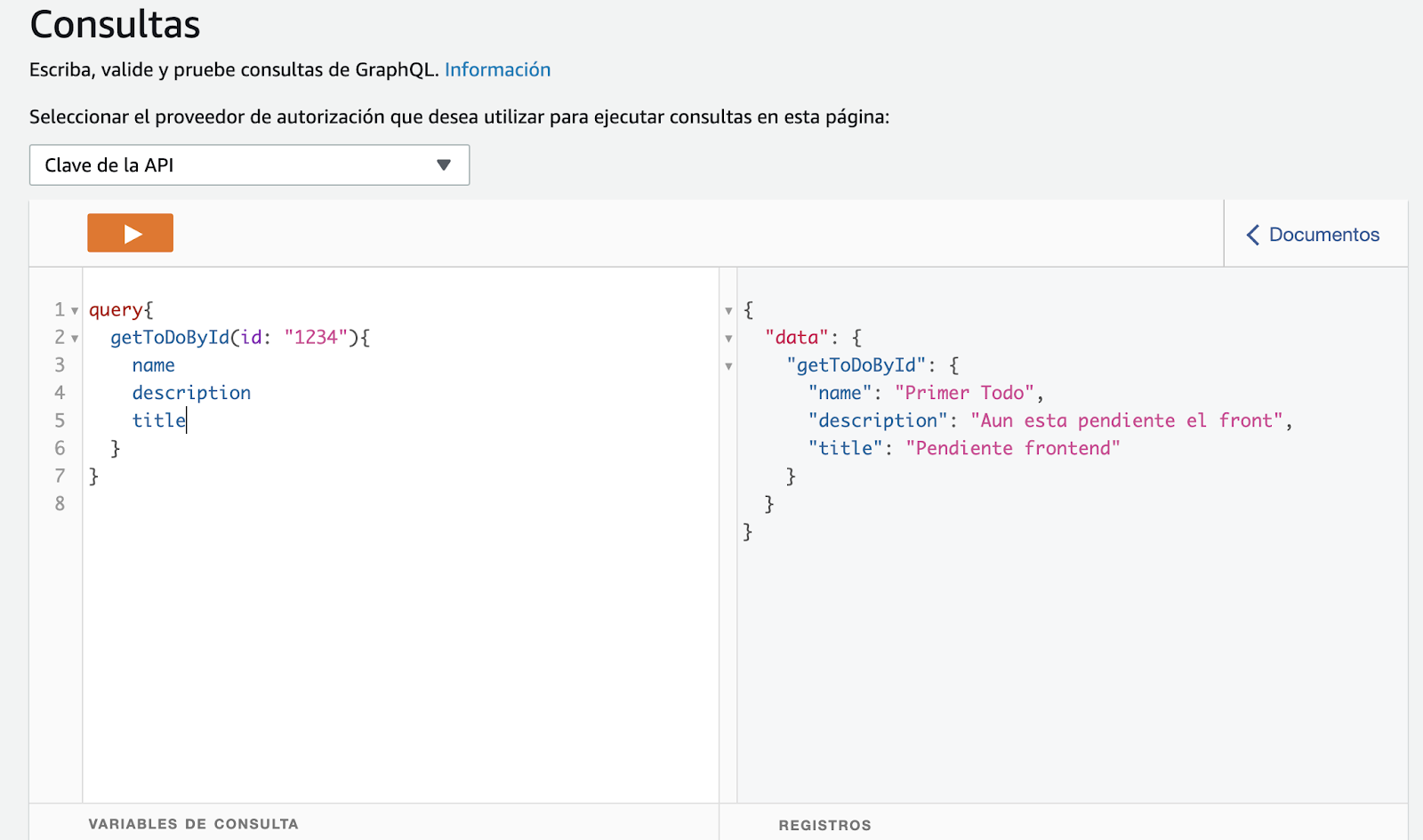
To retrieve data from a ToDo, we should execute the getToDoById **query operation**. We can request the field **name** only, or those that are necessary.
---
There you have:
**In this article, we described GraphQL basic concepts, we designed a simple API from scratch, and deployed it using AWS AppSync and Serverless Framework.**
**Remember that a second part is to come, where we will create a client-side application to consume the API. We will use Amplify+React JS framework, and we will fit our API with more features by using subscriptions for a case of real-time use.**
Join us in the second part of this article!